The June 2026 Jirachi event ran from June 23 at 05:00 to July 8 at 04:59, local time. Its furniture forms Surrounded by stars. Meeting Jirachi at the Center and registering this habitat are separate actions: you can already be friends while the furniture arrangement remains unrecognized.
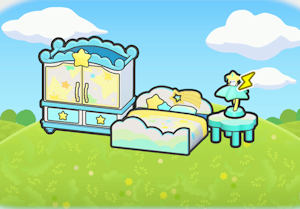
Set aside four Sparkling Wish Notes
- Complete residents' event wishes and exchange four Sparkling Wish Notes for one Star closet, one Starry-sky bed, one Cloud table and one Jirachi lamp. Each costs one note. Ordinary Wish Notes cannot pay for them.
- Group all four pieces closely outdoors. You can put the lamp on the Cloud table. Leave the bed accessible and start with a compact arrangement before adding more decorations.
- Power the lamp from a working electrical network, or ask a Pokémon with Generate to charge it. Check that the Jirachi lamp is actually lit, then wait for the habitat notification.
If the furniture does not form a habitat
Check the lamp first: owning all four objects does not replace the lighting requirement. Bring the pieces closer together if necessary. A furnished interior inside a kit house does not register a new encounter habitat like an outdoor arrangement, so test the setup outside before changing your whole electrical network.
Give Jirachi a home after the event
A befriended Jirachi stays after its shop closes. When it is available to follow you, lead it to the prepared habitat or another suitable home and finish the move-in conversation. You can build this arrangement after the event if you kept the furniture. Missing photographable pieces can also be copied with the Center's printer from object photos; this does not reopen the wish exchange.