In Pokémon Pokopia, you'll spend a lot of time using the game's crafting mechanics, building houses and other structures to create your dream world. So you might wonder how to move existing houses to other locations or how to completely demolish a building. In this guide, we explain the methods for both.
How to move a building?
To move a building from one location to another, you first need to buy a special item from the PC shops in any Pokémon Center.
This item is the Relocation Kit (preparation), which costs only 10 Monevitas and is sold in unlimited quantities.
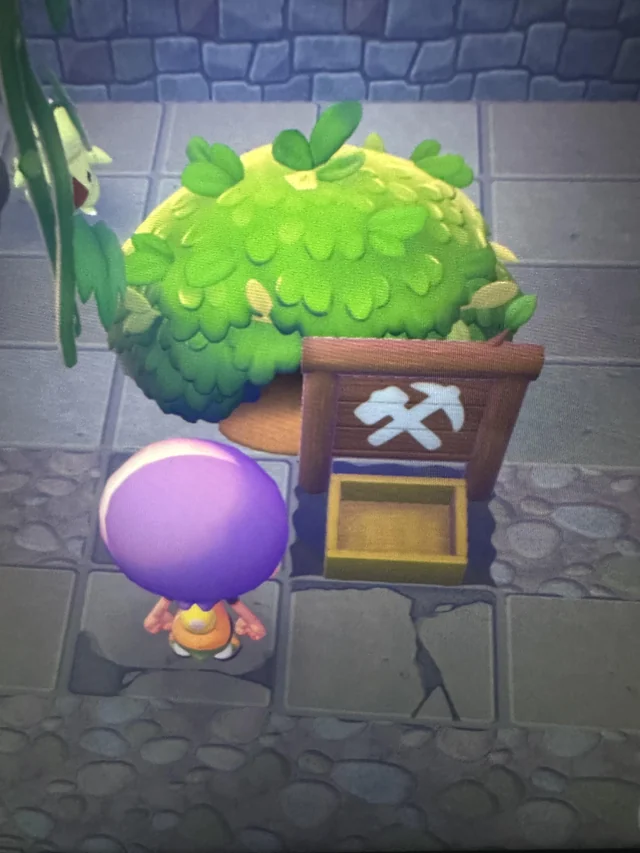
Once you have bought this kit, go to any building you want to relocate and place it right in front of it. Keep in mind that moving constructions only works for houses and structures you have previously created using kits.
You cannot use this kit to move houses that you have built by hand with blocks. Unfortunately, manually created houses can only be moved by destroying the entire building and recreating it elsewhere. Also, if Ditto lives in a kit-built house, make sure to remove its flag from it first to be able to move it.
After placing the relocation kit in front of the building, bring at least one Pokémon with the Demolish Specialty and assign it to the task so it can start the "move".
When the necessary time has passed, you will be able to return the building to your Bag and take it to the new location. Again, you will need several Pokémon to place it there, but you won't have to spend the materials you originally used to create it.
How to demolish a building?
The method for demolishing buildings is very similar to moving them. In this case, you need to buy the Demolition Kit from the PC shops, which also costs 10 Monevitas and is sold in unlimited quantities.
Place this kit in front of the building you want to destroy and bring a Pokémon with the Demolish Specialty to start the work. Note that if any Pokémon live inside the building, you must move them to another house or habitat first, and you also need to remove all the furniture inside.
Keep in mind this kit is only valid for constructions you have created using kits. Buildings made by hand with blocks cannot be demolished this way.
If you have manually created houses that you no longer want, you will have to use Rock Smash to break all the blocks and demolish it yourself, recovering the materials used in the process.