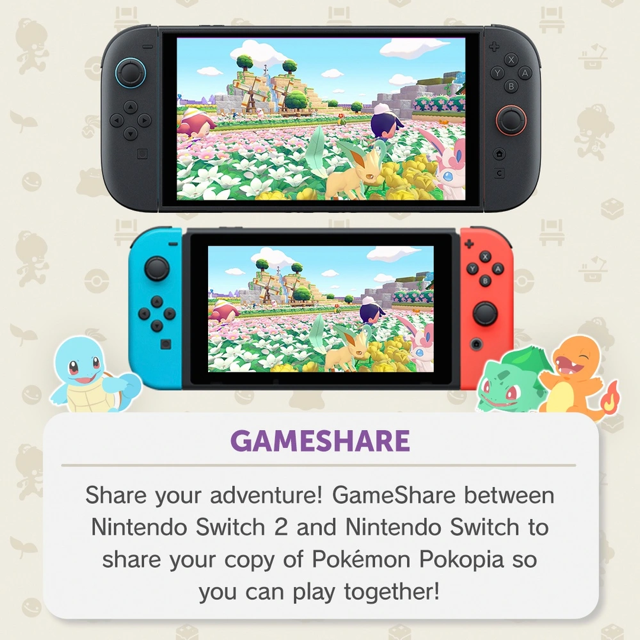
Pokémon Pokopia is a Nintendo Switch 2 exclusive, but that doesn't mean original Switch owners are left out. Using the system's GameShare feature, you can join a Pokopia session from a Switch 1—as long as someone with a Switch 2 and the game is nearby to host.
This guide explains how GameShare works in Pokopia, what you can and can't do on Switch 1, and the exact steps to connect.
Can You Buy Pokopia on Switch 1?
No. Pokopia is not sold or downloadable on the original Switch. The only way to play it on Switch 1 is through GameShare, which streams a shared session from a nearby Switch 2 that owns the game.
Important: GameShare in Pokopia only gives access to Palette Town—the multiplayer hub. You cannot play the main story, manage your own island, or use standard co-op modes from a Switch 1.
What Is GameShare?
GameShare is a local wireless feature that lets a Switch 2 owner invite nearby players—including those on Switch 1—into a shared multiplayer session. In Pokopia, that session is limited to Palette Town. The host must own the game on Switch 2 and have Palette Town unlocked before sending invites.
Palette Town is not available from the beginning. The host needs to finish the first area of Pokopia before this mode unlocks.
Setting Up as Host (Switch 2)
Once Palette Town is unlocked, the host can invite Switch 1 players by following these steps:
- Launch Pokémon Pokopia on the Nintendo Switch 2.
- Travel to Palette Town in-game.
- Find and interact with the PC inside Palette Town.
- Choose Link Play from the menu.
- Select Invite Others to Visit.
- When the prompt appears, pick GameShare.
- Decide whether to connect with nearby players or via GameChat.
Joining as Guest (Switch 1)
For Switch 1 players, the process is short:
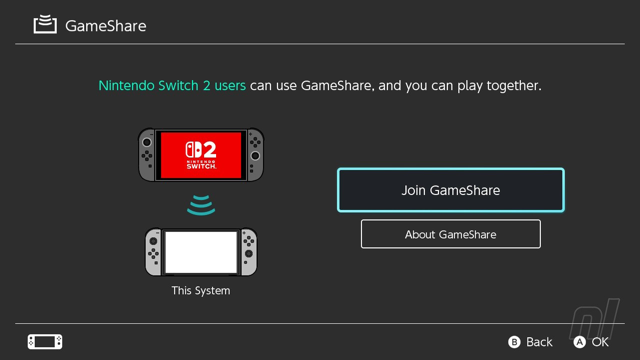
- From the Home Menu, select GameShare.
- Choose Join GameShare to connect to the host's session.
That's it. Once you join, you'll be in the host's Palette Town session. If you're joining as a Switch 2 guest instead, you'll need to pick A Local User after selecting Join GameShare.
What Can Switch 1 Players Do?
Through GameShare, Switch 1 players join as guests in Palette Town only. You cannot:
- Access the main story or your own island
- Use standard co-op or full island mode
- Carry over progress to a future Switch 2 save
Keep in mind: GameShare is a way to try Pokopia's multiplayer with friends, not a replacement for owning the game on Switch 2. For the full experience—building your island, exploring all habitats, and playing the story—you'll need a Nintendo Switch 2.