Exploring, building habitats, and decorating your town means constantly moving furniture and materials around. Your pockets fill up fast. Here's how to expand your carrying capacity and keep everything organized in Pokémon Pokopia.
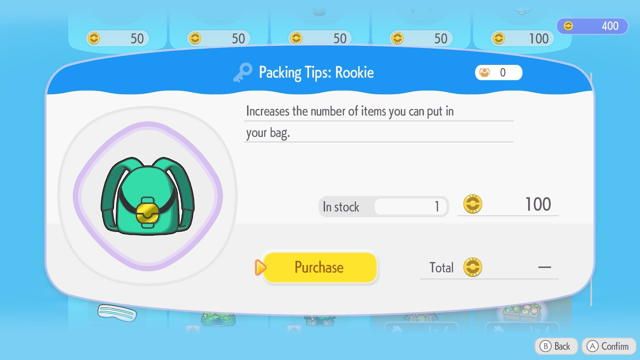
Packing Tips Upgrades
Inventory upgrades come from Packing Tips, bought at the PC for Life Coins.
Packing Tips: Rookie
- Cost: 100 Life Coins
- Unlock: Reach Environment Level 2 in Withered Wasteland
- Effect: Expands inventory from 20 to 30 slots
Packing Tips: Intermediate
- Cost: 500 Life Coins
- Unlock: Reach Environment Level 2 in Rocky Ridges
- Effect: Adds a second page with 30 extra slots
Storage Boxes
When your backpack is full, use Storage Boxes to keep extra items at home. Craft one with 1 Lumber—give Small Logs to a Pokémon with the Chop ability to get Lumber. Larger storage options unlock as you progress.
Handy Bag
Buy the Handy Bag from the Shop for 10 additional slots. It stays visible in the UI even when closed, so you can quickly access your most-used items without opening the full inventory.
Sorting & Organizing
Auto-sort: Hold X to sort your inventory or storage by product type.
Manual sort: Hover over an item, press X to grab it, then drag it to another slot.
Drop it to swap positions with the item there.